
Why I built a budgeting app when good ones exist
A baby on the way, moving to a different country, a new job, and buying a house, all in the last 12 months. That's why I wanted to start budgeting properly. So I looked at what was available. YNAB, Copilot, Monarch... all these are subscription-gated and cloud-dependent. None have a good free tier or great AI features.
Also, according to this Incogni research, they looked at the top 20 Android apps for budgeting and 60% of them shared user data with third parties. Then I looked at open-source options. Actual Budget (25.9k GitHub stars) is genuinely good. Firefly III has double-entry bookkeeping, great as well. But neither have AI features to make my day easier.
After doing this research, it felt like with the new AI tools outthere, a new and better system was possible. Something that combines the best from paid solutions and open source.
So I built Bud-a, short for Budget Agent. It's open-source, local-first, and AI-first. It is built on top of Claude Code. As Claude improves, so will Bud-a. It's open source, so you can clone it right now and run it.
What my week looks like with Bud-a
Before I show you the product, here's what using Bud-a feels like.
- Day to day: When I buy something, I simply take a picture of the receipt and send it to my bud-a agent via Telegram. I can also ask Bud-a, via Telegram still, how much I have left in my budget on this or that category.
- End of the week: I take a screenshot of the history in my bank app, and send it via Telegram. Bud-a filters through what is aready added. Then I open the dashboard on my computer to check my progress.
- End of the month: I open Claude Code and type
/monthly-report. That command generates a full budget analysis comparing actual spending to my targets.
Product walk through
Settings page
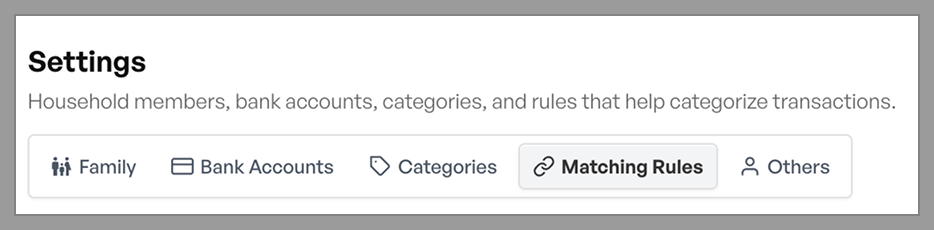
Settings tab showing the matching rules sub-tab with a few natural-language rules
Here, you define the members of your family. You also add your different bank accounts (bank name, account name, owner, currency, starting balance).
Categories are your spending buckets: groceries, dining out, subscriptions, whatever fits your life. Each category has a name, an emoji icon, and a description field. The description isn't decorative, it's what the AI reads when it categorizes a transaction.
Matching rules: Theses are the rules Bud-a uses to match operations and categories. You can create an many expense rules as you want.
Budgets page
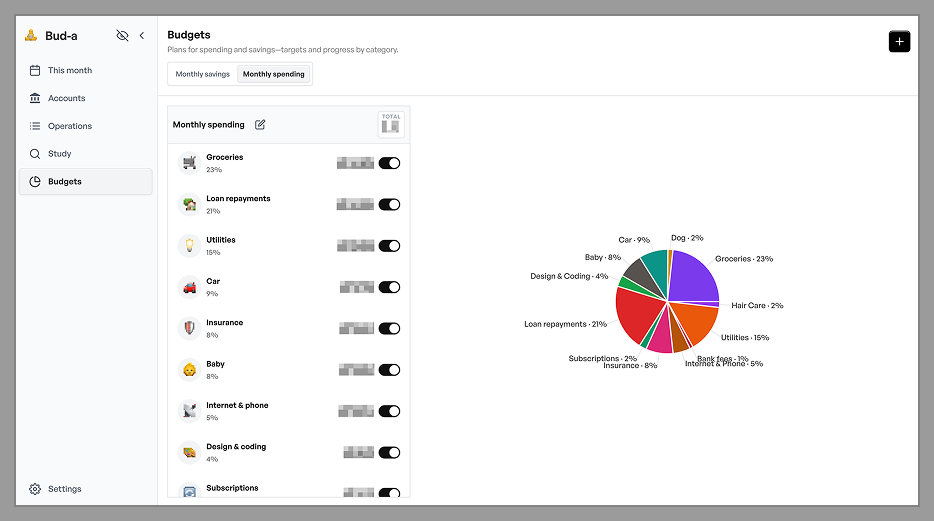
Budget tab showing a spending plan with category cards, pie chart, and the budget history timeline in the side panel
The budgets page allows you to create multiple budget plans. For example, I have 2: my monthly budget and my monthly savings.
Inside each plan, you assign budget amounts to categories: $200/month for groceries, $100/month for dining out, $100/month into the emergency fund. You can change these amounts over time, it won't forget the old amount.
Operations page
The filter bar lets you slice by date range, type, category, account, and family member. A search box handles text search on labels and supports an amount:17 syntax for finding transactions by numerical amount.
A couple KPI cards take the sum or all operations and update in real time as you filter. So this operation's page becomes an analytical tool.
Study page
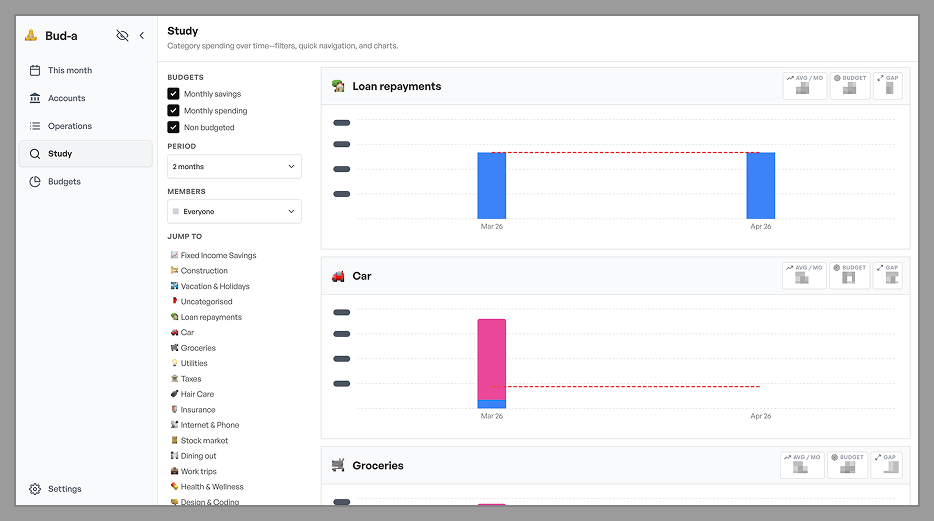
Study tab showing two or three category charts with stacked bars, budget lines, and the gap metric highlighted
Study is where you learn about your spending behavior. It shows a grid of charts, one per category. It uses stacked bars broken down by family member. And you can also see the budget line.
Three KPI chips sit above each chart to show you multi month averages.
Every chart bar is clickable. Click a bar and the app navigates to Operations, pre-filtered to that category, month, and member. Ex: If you see an anomaly in February dining expenses, click it, see every transaction.
"This Month" page
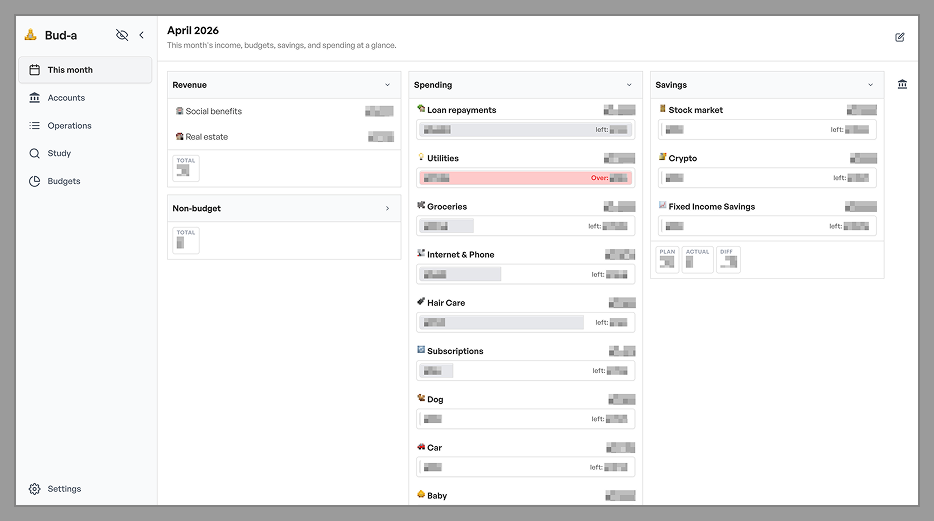
Dashboard tab in layout editing mode, showing the widget grid and account side panel
The dashboard is your morning view. It is made of configurable widgets, so you pick what you want to see in there. You want a widget that shows only the husband's surfing equipment spending each month? You can build that. You want a widget to track the groceries on account X. Also possible.
In addition to this fully customization board, a side panel shows all your account balances for the current month. Click any account and the app navigates to Operations filtered to that account.
Accounts page
A clean inventory of your accounts. This helps you know if your total wealth is going up or down.
Getting started: how to launch Bud-a
Prerequisites: Python 3.10+, Node.js 18+, and Claude Code, the AI engine that powers the agents. You need an active Claude subscription.
1/ Clone the repo
git clone https://github.com/bprigent/bud-a2/ Run start.sh
cd bud-a
./start.sh
One command starts both the Python backend and the React frontend. The start.sh script will ask a few questions to customize the app to your needs.
3/ Open the browser
Navigate to http://localhost:5173. That's it.
4/ Connect the Telegram channel
Open Telegram and find @BotFather. Send it the command /newbot, follow the prompts, and copy the API token it gives you.
Save that token in a file at .claude/channels/telegram/.env inside your bud-a directory:
TELEGRAM_TOKEN=your_token_hereThis file is gitignored and never committed. Then DM your new bot from your personal Telegram account. It will reply with a pairing code. You'll use that code in step 5. This security step means only you can send commands to your agent.
5/ Run Claude Code with the Telegram channel
From inside the bud-a directory, open a new terminal session.
claude --channels plugin:telegram@claude-plugins-officialWhen the session starts, use the pairing code from step 4 when Claude code asks you. From that point, it's all set up. You can send a receipt photo to the Bud-a Telegram bot The web UI will update automatically.
3 AI Agents coordinate the financial work
Bud-a has 3 sub-agents dedicated to Finance activities. Each one has a single job. But they share one common design principle: agents must verify with their human before updating financial data.
FYI, you don't need to name these agents for them to do their job, the orchestrator knows who to call.
The receipt-parser
This is the agent that will receive photos and text and match them to categories and store them in the right CSV. It knows your matching rules and category descriptions and will suggest a match. Only after you approve does it add the transaction to operations.csv.
If the photo is blurry or the amount is ambiguous, it asks rather than guesses. The confirmation step is the trust mechanism.
The budget-analyst
Type /monthly-report in Claude Code and the budget-analyst agent reads all your transactions for this month, and generates a natural-language spending debrief. This agent has a hard constraint: "Never modify data files. You are read-only." It can analyze but can never write.
This scoping is deliberate. An analytical tool that can't accidentally corrupt your data is one you can trust to run freely.
The backup-manager
Type /backup and the agent bundles all your CSV files, encrypts them with a password you choose using PBKDF2-SHA256, and saves the result as a timestamped .enc file. Restoring requires only that password.
PBKDF2-SHA256 is a standard, well-understood key derivation scheme (used in WPA2, iOS keychain, and LUKS). FYI, if you know a better way, please let me know, I'd love to make local backups even safer.
What's next
Bud-a is a work in progress. 4 things are on the roadmap.
- Multi-currency support: For households with international accounts or expenses in different currencies. The data model already stores currency codes per account, but it's not used anywhere.
- Planned operartions: I want to be able to list expenses that we know are coming so we can forecast the month a little better.
- More agents! The architecture supports it. Claude Code's custom slash commands and agent SDK make it straightforward to add new capabilities. I am thinking taxes, taxes, and more taxes.
- Better backup: I am wondering if I can create a recurring backup system.